Analysis Plugins
Since SCT v3.2.0, analysis implementations live in external Python packages and are discovered at runtime through
the sct.analyses entry point namespace.
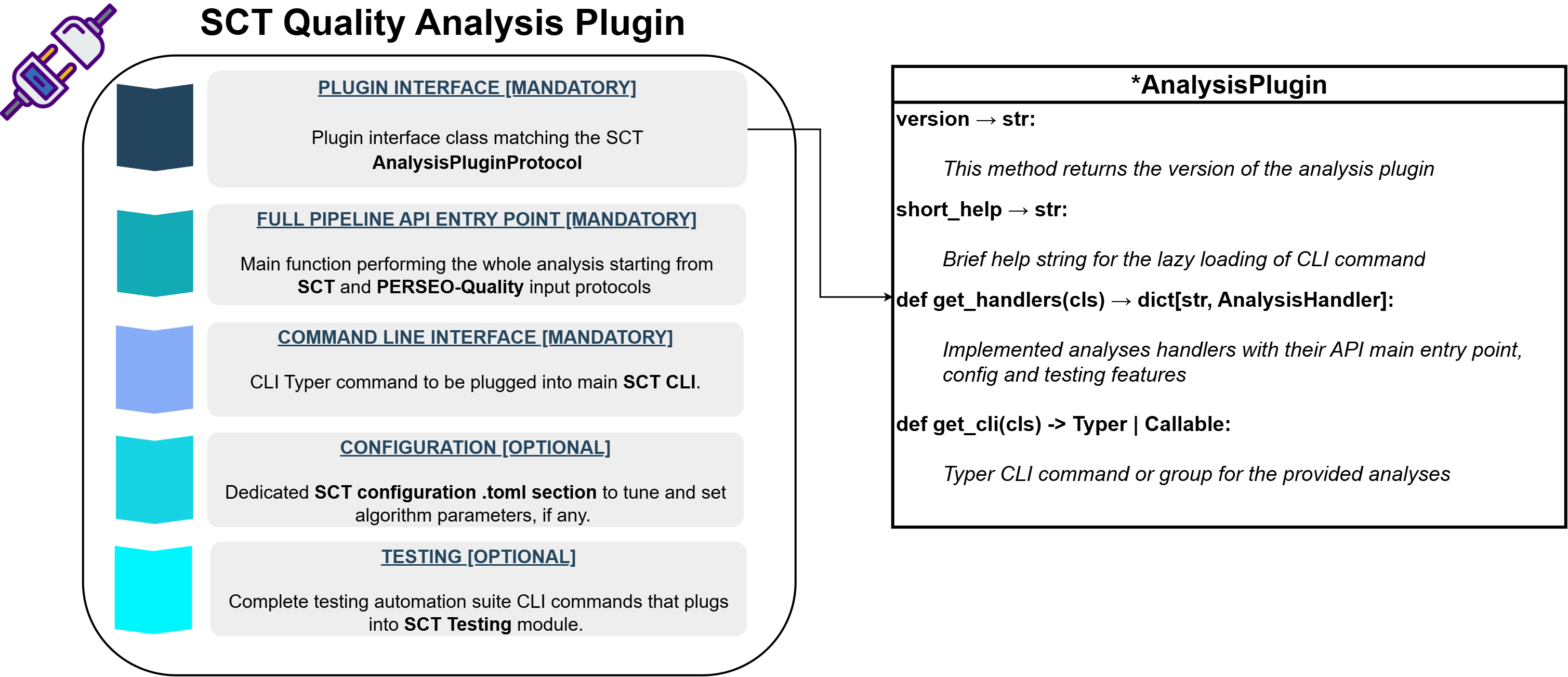
Each analysis plugin is a standalone installable package that implements the sct.plugins.protocols.AnalysisPluginProtocol.
Protocol
The plugin class must satisfy AnalysisPluginProtocol which requires:
class AnalysisPluginProtocol(Protocol):
    version: str
    short_help: str

    @classmethod
    def get_cli(cls) -> Typer | Callable: ...
    @classmethod
    def get_handlers(cls) -> dict[str, AnalysisHandler]: ...
version— package version, typically imported from__init__.short_help— one‑line description shown in thesct --helpoutput.get_cli()— returns a Typer command or callable (orNone).get_handlers()— returns a dictionary mapping analysis type names toAnalysisHandlerinstances.
Analysis Handler
Each handler bundles three concerns using the sct.core.base.AnalysisHandler dataclass:
@dataclass
class AnalysisHandler:
    config: Any                                          # AnalysisConfigABC subclass
    cli: Typer | Callable | None                         # CLI command
    testing: AnalysisTestingHandler | None               # testing hooks
    cli_group_name: str | None = None                    # optional group name
A single plugin may expose more than one handler (e.g., radiometry exposes nesz, rain-forest, profiles and
scalloping under a shared cli_group_name="radiometry").
Entry Point Registration
Plugins declare themselves in pyproject.toml under the sct.analyses namespace:
[project.entry-points."sct.analyses"]
<analysis_name> = "sct_<analysis_name>_analysis.interface:<AnalysisName>AnalysisPlugin"
Discovery and CLI Integration
SCT uses two mechanisms to load analysis plugins:
-
CLI lazy loading — at startup,
importlib.metadata.entry_points()scans thesct.analysesnamespace. Only the lightweightinterface.pymodule is imported. The actual CLI command is loaded only when the user invokes the subcommand. -
Analysis registry — when programmatic access is needed, stevedore loads all plugins and calls
get_handlers()to populate the globalANALYSIS_REGISTRYviaregister_analysis().
Available Analysis Plugins
The following analysis plugins are installed along SCT when installing the software with the [recommended] extra:
| Analysis | Package | CLI Command |
|---|---|---|
| Point Target | sct-point-target-analysis |
sct point_target |
| Radiometry | sct-radiometric-analysis |
sct radiometry (group) |
| Spectra | sct-spectral-analysis |
sct spectra |
| Elevation Notch | sct-notch-analysis |
sct elevation_notch |
| Interferometry | sct-interferometric-analysis |
sct interferometry |
| Ambiguity Ratio | sct-ambiguities-analysis |
sct ambiguities |
Refer to the plugins documentation site for detailed documentation of each analysis plugin, including usage, configuration and API references.
Installation and Usage
To install the default set of analysis plugins using pip, refer to the installation guide.
To install a specific plugin for SCT using pip:
Then the software can discover automatically all the installed plugins and perform analyses on products corresponding to the installed plugins.
Creating a New Analysis Plugin
For a step-by-step guide on developing and packaging a new analysis plugin, refer to the developer guide.