Creating a New Analysis Plugin
Since SCT v3.2.0, analysis implementations live in external Python packages and are
discovered at runtime through the sct.analyses entry point namespace. Each analysis
plugin is a standalone installable package that implements the
sct.plugins.protocols.AnalysisPluginProtocol.
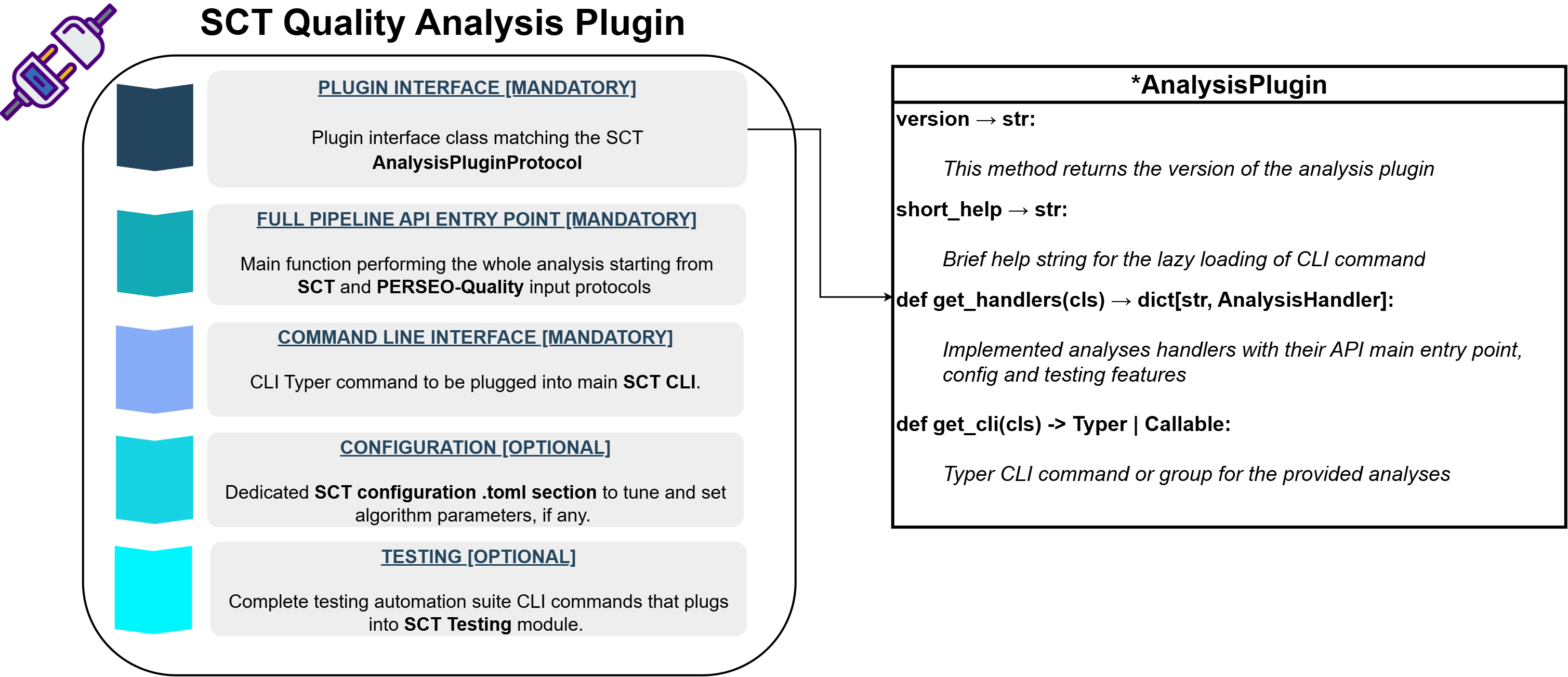
This decoupling means:
- Analyses can be developed, versioned and released independently of the core SCT package.
- Users install only the plugins they need.
- The core SCT CLI automatically discovers and registers all installed analysis commands.
Refer to the plugins documentation site for an overview of available analysis plugins and their documentation.
Package Structure
A minimal analysis plugin package looks like the following:
📁 sct_<analysis_name>_analysis
├── 📁 src
│   └── 📁 sct_<analysis_name>_analysis
│       ├── 🐍 __init__.py          # __version__ only
│       ├── 🐍 interface.py         # plugin class (lightweight)
│       ├── 🐍 cli.py               # Typer CLI command(s)
│       ├── 🐍 config.py            # AnalysisConfigABC subclass
│       ├── 🐍 testing.py           # test runners and validator
│       ├── 🐍 main.py              # core analysis pipeline
│       └── 📁 resources/
│           └── 📄 config_schema.json
├── ⚙️ pyproject.toml               # entry points + dependencies
├── 📄 LICENSE.txt
└── 📄 README.md
1. Plugin Entry Point (interface.py)
This module must be lightweight — importing it should not pull in the scientific stack or the heavy analysis implementation. All heavy imports are deferred inside the accessor methods.
from __future__ import annotations

from typing import TYPE_CHECKING, Callable

from sct_<analysis_name>_analysis import __version__

if TYPE_CHECKING:
    from sct.core.base import AnalysisHandler
    from typer import Typer

ANALYSIS_NAME = "<analysis_name>"


class <AnalysisName>AnalysisPlugin:

    version = __version__
    short_help = "<Short description shown in sct --help>"

    @classmethod
    def get_cli(cls) -> Typer | Callable:
        from sct_<analysis_name>_analysis.cli import analysis_command

        return analysis_command

    @classmethod
    def get_handlers(cls) -> dict[str, AnalysisHandler]:
        from sct.core.base import AnalysisHandler, AnalysisTestingHandler

        from sct_<analysis_name>_analysis.config import AnalysisConfig
        from sct_<analysis_name>_analysis.testing import (
            run_api, run_cli, validate_results,
        )

        return {
            ANALYSIS_NAME: AnalysisHandler(
                config=AnalysisConfig,
                cli=cls.get_cli(),
                testing=AnalysisTestingHandler(
                    api_runner=run_api,
                    cli_runner=run_cli,
                    validator=validate_results,
                ),
            )
        }
Protocol Requirements
The class must satisfy AnalysisPluginProtocol which requires:
version: str— typically imported from__init__.short_help: str— one-line description shown in the CLI help.get_cli()— returns aTypercommand or callable (orNoneif no CLI).get_handlers()— returnsdict[str, AnalysisHandler]mapping analysis type names to their handlers.
Deferred Imports
- Type hints use
TYPE_CHECKINGguards. get_cli()imports the CLI module only when the user invokes the command.get_handlers()imports config and testing modules only when the handler is needed.
This keeps sct --help fast regardless of how many plugins are installed.
2. CLI Command (cli.py)
Define a Typer command that accepts standard SCT CLI options from
sct.cli.common plus any analysis-specific options.
from __future__ import annotations

from pathlib import Path

import typer
from sct.cli import common
from sct.configuration.config import GeneralConfiguration
from sct.configuration.logger import sct_logger

from sct_<analysis_name>_analysis.config import AnalysisConfig


def analysis_command(
    ctx: typer.Context,
    product: common.InputProductOption,
    output_directory: common.OutputDirectoryOption,
    graphs: common.GraphsOption = False,
) -> None:
    config: GeneralConfiguration = ctx.obj

    analysis_config = (
        AnalysisConfig.from_toml(config.toml_path)
        if config.toml_path is not None
        else AnalysisConfig()
    )

    from sct_<analysis_name>_analysis.main import full_analysis

    full_analysis(
        product=product,
        output_directory=output_directory,
        config=analysis_config,
        graphs=graphs,
    )
If the analysis has sub‑analyses (e.g., radiometry with nesz, rain-forest,
profiles, scalloping), define a Typer group and use cli_group_name in the
handler so all sub‑analyses appear under one CLI group.
3. Configuration Class (config.py)
Each analysis must provide a configuration class implementing
sct.configuration.config_abc.AnalysisConfigABC.
from __future__ import annotations

from dataclasses import dataclass, field
from pathlib import Path
from typing import Any

from sct.configuration.config_abc import AnalysisConfigABC
from sct.configuration.common import InvalidConfigurationFile

from sct_<analysis_name>_analysis.resources import config_schema


@dataclass
class AnalysisConfig(AnalysisConfigABC):
    some_param: int = 42
    config_group_name = "<analysis_name>"
    validation_schema = Path(config_schema)

    @classmethod
    def from_dict(cls, arg: dict) -> AnalysisConfig:
        # Parse arg dict, validate, return instance
        ...

    def to_dict(self) -> dict:
        # Return dict with config_group_name as key
        ...
The base class provides from_toml() and to_toml() — you only need to
implement from_dict() and to_dict().
4. Testing Hooks (testing.py) — Optional
If your analysis supports automated validation, provide three functions:
from sct.testing.utilities.common import ReferenceOutput, TestOutput, TestParams


def run_api(params: TestParams, output_dir: Path, config: AnalysisConfig | None, graphs: bool) -> TestOutput:
    ...


def run_cli(params: TestParams, output_dir: Path, config: Path | None, graphs: bool) -> TestOutput:
    ...


def validate_results(current_output: TestOutput, reference_output: ReferenceOutput) -> None:
    ...
Set testing=None in the AnalysisHandler if testing is not implemented.
5. Register the Plugin (pyproject.toml)
Add an entry point under the sct.analyses namespace:
[project.entry-points."sct.analyses"]
<analysis_name> = "sct_<analysis_name>_analysis.interface:<AnalysisName>AnalysisPlugin"
The SCT CLI scans this namespace at startup using importlib.metadata.entry_points
and registers each plugin's command lazily.
6. Core Analysis Logic (main.py)
This is where the actual algorithm lives. The function signature should accept a product path, output directory, configuration, and return the results path.
from pathlib import Path

from sct_<analysis_name>_analysis.config import AnalysisConfig


def full_analysis(
    product: Path,
    output_directory: Path,
    config: AnalysisConfig | None,
    graphs: bool,
) -> Path:
    # … algorithm logic …
    return output_directory / "results.csv"
Best Practices
- Keep
interface.pylightweight — no heavy imports at module level. - Defer imports of the scientific stack to the accessor methods.
- Declare SCT as a dependency in
pyproject.toml. - Provide a JSON Schema for configuration validation.
- Use
__version__from the package__init__for theversionattribute. - Write unit tests using representative product samples.
Common Mistakes
❌ Importing heavy libraries (numpy, scipy, perseo) at the top of interface.py.
❌ Forgetting to declare the entry point in pyproject.toml.
❌ Not implementing to_dict() / from_dict() in the configuration class.
❌ Registering subcommands individually instead of using a group + cli_group_name.