Internal Structure
Every analysis plugin must satisfy the sct.plugins.protocols.AnalysisPluginProtocol.
The protocol is intentionally input-agnostic: each plugin defines, validates and
provides its own inputs, configuration, CLI and testing hooks.
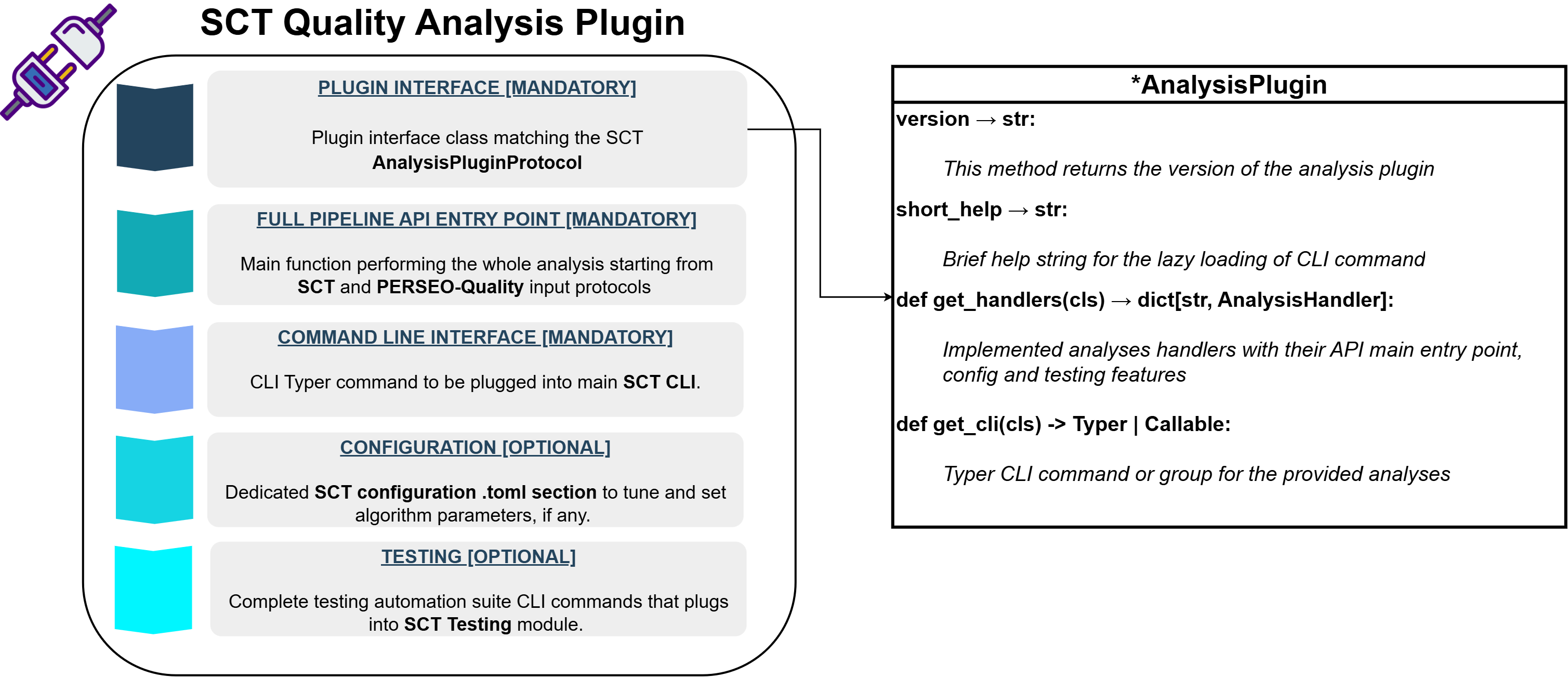
A minimal implementation looks like the following:
from __future__ import annotations

from typing import TYPE_CHECKING, Callable

from sct_<analysis_name>_analysis import __version__  # (1)!

if TYPE_CHECKING:
    from sct.core.base import AnalysisHandler
    from typer import Typer

ANALYSIS_NAME = "<analysis_name>"


class <AnalysisName>AnalysisPlugin:  # (2)!

    version = __version__
    short_help = "<Short description of the analysis>"

    @classmethod
    def get_cli(cls) -> Typer | Callable:
        from sct_<analysis_name>_analysis.cli import analysis_command

        return analysis_command

    @classmethod
    def get_handlers(cls) -> dict[str, AnalysisHandler]:
        from sct.core.base import AnalysisHandler, AnalysisTestingHandler

        from sct_<analysis_name>_analysis.config import MyAnalysisConfig
        from sct_<analysis_name>_analysis.testing import (
            run_api,
            run_cli,
            validate_results,
        )

        return {
            ANALYSIS_NAME: AnalysisHandler(
                config=MyAnalysisConfig,
                cli=cls.get_cli(),
                testing=AnalysisTestingHandler(
                    api_runner=run_api,
                    cli_runner=run_cli,
                    validator=validate_results,
                ),
            )
        }
- Substitute
<analysis_name>with
the name of the analysis. - Substitute
<AnalysisName>with
the name of the analysis.
The plugin is responsible for:
- Exposing a CLI command that SCT can register in its top-level interface.
- Providing an analysis handler that bundles configuration, CLI and testing together.
- Keeping the entry-point module lightweight so importing it does not pull in the scientific stack.
The version attribute should contain the version of the plugin package. This is typically imported from the package init.
The short_help attribute provides a one-line description shown in the SCT CLI help output.
Keeping track of the plugin version helps SCT:
- ensure compatibility between plugins and the core framework
- improve reproducibility of analysis results
- assist debugging and reporting
Deferred Imports
The entry-point module (typically interface.py) must not import the heavy analysis
implementation or the scientific stack at module level. All heavy imports are deferred
inside the accessor methods. This is why:
TYPE_CHECKINGguards are used for type hints that would otherwise require heavy imports.get_cli()imports the CLI module only when the command is actually invoked.get_handlers()imports the config and testing modules only when the handler is needed.
This pattern ensures that sct --help remains fast and that plugins can be discovered
without loading their dependencies.
Analysis Handler
The class method get_handlers() must return a dictionary mapping analysis type names
to sct.core.base.AnalysisHandler instances.
@dataclass
class AnalysisHandler:
    config: Any
    cli: Typer | Callable | None
    testing: AnalysisTestingHandler | None
    cli_group_name: str | None = None
Each handler bundles the following concerns:
config: the configuration class for the analysis (must implementAnalysisConfigABC).cli: a Typer command or callable that SCT registers as a CLI subcommand.testing: anAnalysisTestingHandlerthat defines how to run the analysis via API and CLI and how to validate results against a reference.cli_group_name: optional; when set, multiple handlers share the same CLI group instead of each creating its own.
A single plugin may expose more than one analysis type. For example the radiometry plugin
registers four analyses (nesz, rain-forest, profiles, scalloping) under the
same cli_group_name="radiometry".
return {
    "radiometry-nesz": AnalysisHandler(
        config=...,
        cli=cls.get_cli(),
        testing=AnalysisTestingHandler(...),
        cli_group_name="radiometry",
    ),
    "radiometry-rain-forest": AnalysisHandler(
        config=...,
        cli=cls.get_cli(),
        testing=AnalysisTestingHandler(...),
        cli_group_name="radiometry",
    ),
    ...
}
Analysis Configuration
The configuration class passed to AnalysisHandler.config must implement
sct.configuration.config_abc.AnalysisConfigABC.
class AnalysisConfigABC(ABC):
    validation_schema: Path
    config_group_name: str

    @classmethod
    @abstractmethod
    def from_dict(cls, arg: dict) -> Self: ...

    @abstractmethod
    def to_dict(self) -> dict: ...

    @classmethod
    def from_toml(cls, file: str | Path) -> Self: ...

    def to_toml(self, out_file: Path) -> None: ...
The configuration class:
- Declares a
validation_schemapointing to a JSON Schema file used to validate the TOML configuration. - Declares a
config_group_namethat identifies the section in the global SCT configuration file. - Implements
from_dict/to_dictfor serialization. - Inherits
from_toml/to_tomlwhich read and write TOML files using the coreGeneralConfigurationframework.
Testing Handler
The AnalysisTestingHandler dataclass defines how SCT's sct testing subcommand runs
and validates the analysis.
@dataclass
class AnalysisTestingHandler:
    api_runner: Callable[[TestParams, Path, Any | None, bool], TestOutput]
    cli_runner: Callable[[TestParams, Path, Path | None, bool], TestOutput]
    validator: Callable[[TestOutput, ReferenceOutput], None]
api_runner: runs the analysis programmatically, receives the configuration object directly.cli_runner: runs the analysis via CLI invocation, receives a path to the config file.validator: compares the current output against a reference, typically usingpandas.testing.assert_frame_equalwith analysis-specific tolerances.
If testing is not implemented, set testing=None in the AnalysisHandler.
Registering the Plugin
To allow SCT to discover the plugin automatically, the plugin class must be registered
through a Python entry point in the sct.analyses namespace.
In your pyproject.toml file:
[project.entry-points."sct.analyses"]
<analysis_name> = "sct_<analysis_name>_analysis.interface:<AnalysisName>AnalysisPlugin"
Where:
sct.analysesis the entry point namespace used by SCT for analysis plugins.<analysis_name>is the plugin identifier used as the CLI subcommand name.sct_<analysis_name>_analysis.interface:<AnalysisName>AnalysisPluginis the import path to the plugin class.
Example
This registers the class PointTargetAnalysisPlugin as an analysis plugin for SCT.
Plugin Discovery
SCT uses two mechanisms to discover and load analysis plugins:
CLI Lazy Loading
At startup, the SCT CLI scans the sct.analyses entry point group using Python's
importlib.metadata.entry_points. Each plugin class is loaded lightly (only the
interface.py module is imported) and its short_help is extracted. The actual CLI
command is only loaded when the user invokes the subcommand.
from importlib.metadata import entry_points

for entry_point in entry_points(group="sct.analyses"):
    plugin = entry_point.load()
    subcommands[entry_point.name] = _LazySubcommand(
        _analysis_loader(plugin, entry_point.name),
        getattr(plugin, "short_help", ""),
    )
This approach keeps sct --help fast regardless of how many plugins are installed.
Analysis Registry
When the analysis registry is needed (e.g. for the sct info command or programmatic
access), SCT uses OpenStack's stevedore to load plugins:
from stevedore import ExtensionManager
from sct.plugins.protocols import AnalysisPluginProtocol

manager = ExtensionManager(
    namespace="sct.analyses",
    invoke_on_load=True,
    on_load_failure_callback=_on_load_failure,
)

for extension in manager:
    plugin = extension.plugin
    if isinstance(plugin, AnalysisPluginProtocol):
        for analysis_type, handler in plugin.get_handlers().items():
            register_analysis(analysis_type, handler)
The registry is cached after the first load and can be refreshed with load_analyses(force=True).
flowchart TD
    A["SCT CLI (startup)"]
    B["entry_points(sct.analyses)"]
    C["LazyGroup"]
    D["User invokes subcommand"]
    E["plugin.get_cli()"]
    F["plugin.get_handlers()"]
    G["AnalysisHandler"]
    H["Analysis Registry"]

    A --> B
    B --> C
    D --> E
    E --> F
    F --> G
    G --> H
Best Practices
When developing a plugin:
- Keep the entry-point module (
interface.py) lightweight – only imports needed for type hints, ideally underTYPE_CHECKING. - Defer all heavy imports (scientific stack, main logic) to the accessor methods.
- Keep analysis-specific logic isolated inside the plugin package.
- Avoid introducing dependencies into the core
sctpackage. - Provide unit tests using representative product samples.
- Implement the testing handler with
api_runner,cli_runnerandvalidator. - Clearly document the supported product version and sensor.
Distribution
Plugins can be distributed independently from SCT via PyPI or internal/local package repositories.
This allows users to install only the plugins required for the specific analyses they want to run.